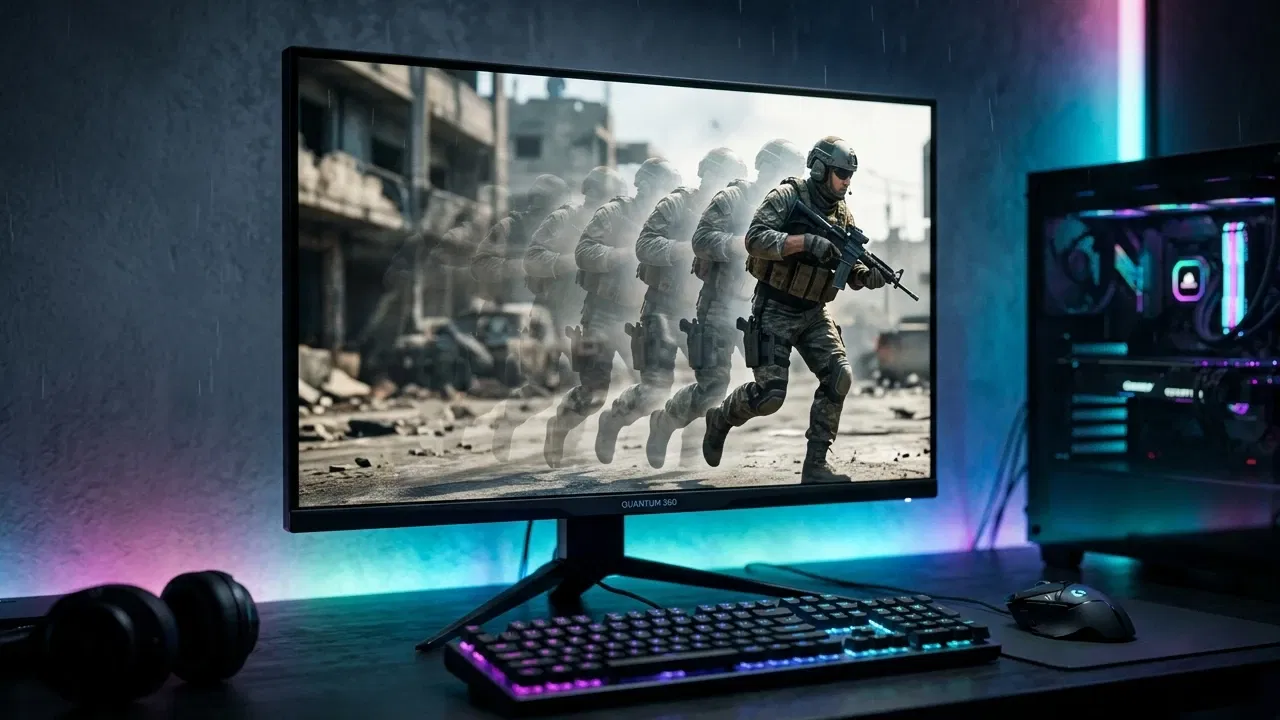
While gamers and consumers have become somewhat used to 144 Hz displays in recent years, more recent pushes in technology have seen 360 Hz monitors emerge on the market. Is a 360 Hz monitor a worthwhile upgrade over 144 Hz? Here we answer these questions and more.
Understanding Monitor Refresh Rate and Framerate
Refresh rate refers to the number of times a monitor “refreshes” with a new frame in one second. The standard refresh rate for most monitors, TVs, and phones is 60 Hz. Refresh rate is closely tied to framerate (FPS), but the two are not exactly the same.
You can run a game at 100 FPS on a 60Hz monitor, but you won’t actually see the full benefits of 100 FPS. This is because your refresh rate determines the maximum framerate that your monitor can actually display.
Additionally, running games at a framerate higher than your monitor can support will result in screen tearing, which is disruptive to any gaming experience.
How Refresh Rate (and Framerate) Impacts Your Gameplay
Does a higher refresh rate and framerate make you better at games?
Yes and no. Ultimately, your skill and practice is going to be what determines your results, especially in eSports titles. However, low framerates and refresh rates are a bit of a disadvantage, especially if you have difficulty maintaining 60 FPS.
Real life is not perceived in individual frames like movies or games are, but if it were, you could imagine it as an effectively unlimited framerate. The only limiter on your ability to react to things in real life is your own hand-eye coordination.
Monitors are another story, though, and even a 144 Hz monitor is a far cry from true-to-life motion. The simplest way to explain the difference between two otherwise-equal players with different monitors is that the one with the higher refresh rate is seeing the game update faster than the other player, and thus has more effective time to react. Additionally, higher render framerate fundamentally means less input lag, since each frame is another instant at which your inputs can be read by the game engine.
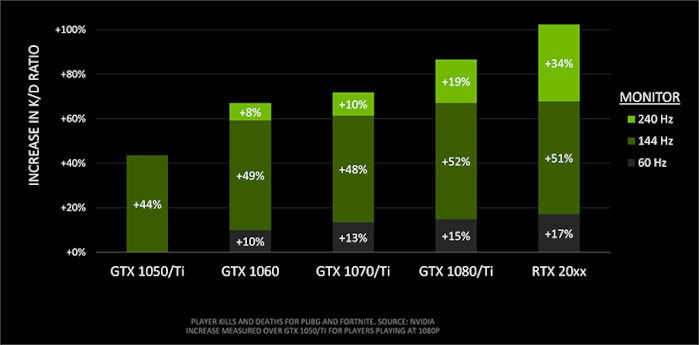
Especially in high octane action games, this can make all the difference. Research shows a tangible improvement in player performance in Battle Royale titles with higher refresh rates.
Want to test out different refresh rates yourself? Click here to open the UFO Test in a compatible desktop browser. (Note: you will still be limited by your current monitor’s refresh rate but will be able to easily see the difference between high and low FPS.)
The CPU-Refresh Rate Relationship
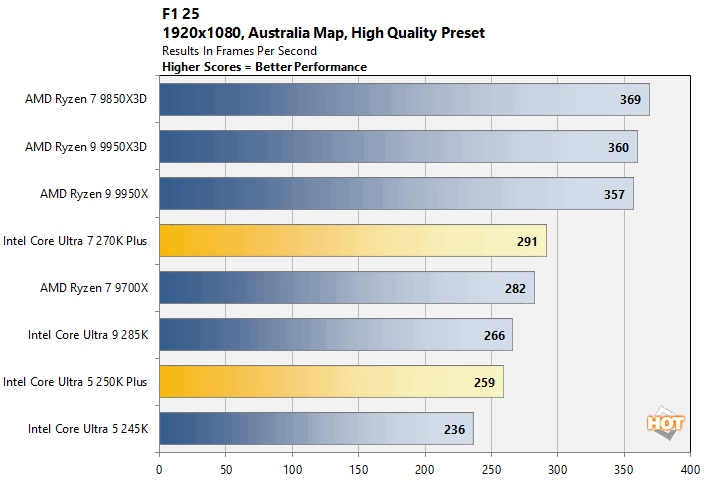
In some ways, the CPU may be the more important component to consider than your GPU when you’re considering a high refresh rate monitor. The reason for this is simple: your GPU bottleneck, which is its rendering power, can be alleviated by lowering resolution or other graphics settings.
But no matter how low those settings get or how powerful your GPU gets, your final framerate will be restrained by the CPU, which still has to process all the non-visual information (game logic) the GPU and RAM are giving it to manage. You can play at 4K and 60 FPS with weak hardware if you make extreme graphics settings changes, but you’re only playing at 120+ FPS if your CPU can actually run games that fast. For high-refresh rate displays, this makes high-end Intel Core i5+ and AMD Ryzen 5+ CPUs an ideal pick, especially the high-end Ryzen X3D CPUs and Unlocked K Series Intel Core (Ultra) CPUs.
Graphics techniques like real-time ray tracing and game genres with large open worlds and lots of entities, like battle royales or open world RPGs, also tend to have higher CPU requirements for high framerates.
The GPU-Refresh Rate Relationship
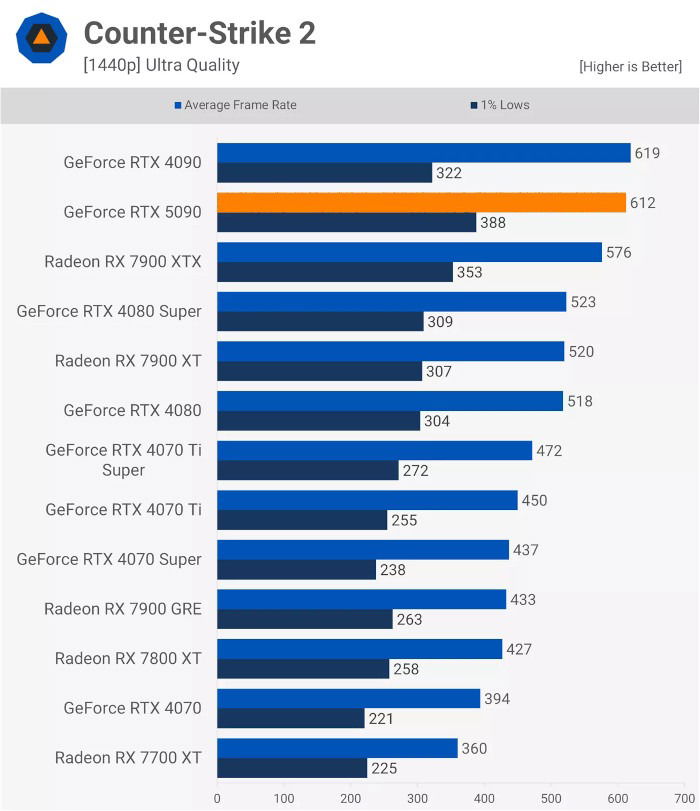
So, as alluded to in the previous section, you can actually get away with a low or mid-range GPU on a high refresh rate display if you’re willing to play games at lower settings or resolutions. Especially if a game has ray tracing or the higher-end path tracing, actually running that title at 120+ FPS can be extremely punishing on even the best high-end GPUs, making it best to disable those settings if you want to maximize the benefits of high refresh rates.
But there is also something to be said about pushing the limits of your graphics hardware—and sometimes, a game actually can be less CPU-intensive and more brutally GPU-intensive. In those cases, you’ll really want a mid-range or high-end GPU to get a playable experience, much less hope to target native refresh on a 360 Hz monitor.
A Quick Note on Response Times and Panel Types
When looking into high refresh rate displays, response time and panel type become much more important.

Response time (more accurately called pixel response time) measures the amount of time it takes for individual pixels to change colors. If your response time is too high, your image will be prone to ghosting and artifacts, which reduces the benefits of a high refresh rate in the first place.
Panel type has a direct impact on pixel response time due to the limitations of the technologies currently on the market. The main three panel types are TN, IPS, and VA.
- Twisted Nematic (TN) panels have the lowest response times and highest refresh rates per dollar, but at the cost of much worse image quality—especially noticeable when viewed off-axis.
- In-Panel Switching (IPS) panels can have great response times and refresh rates and have superb colors but tend to be prohibitively expensive and slightly slower than TN panels at entry-level prices. Viewing angles are great, too.
- Vertical Alignment (VA) panels are a decent in-between with especially good dark room performance, but VA panels are also the most notorious for having poor response times, even on high refresh rate VA displays. Viewing angles tend to be better than TN, though.
- OLED panels have been the best panel type for gaming and media consumption alike for a long while now, thanks to their superb color, contrast, HDR, and per-pixel dimming features. Until the debut of G-Sync Pulsar, OLED even had by far the best motion clarity of any modern flat panel type, and OLEDs still dominate the high-end TV and monitor markets for these reasons and more.
- G-Sync Pulsar IPS panels are a specifically-engineered version of IPS panels which utilize Nvidia’s proprietary G-Sync technology with supported Nvidia GPUs to achieve superb motion clarity on flat panels, arguably better than OLEDs at the same refresh rate. However, Pulsar’s benefits are exclusive to PC games and Nvidia GPUs, and still have the same downsides to contrast, brightness, and HDR as IPS does versus OLED.
With all of this information in mind, we recommend sticking to high-speed TN, IPS, or OLED panels if you choose to opt for a high refresh rate monitor (144 Hz or higher), and a response time of 5-1 ms, with 1 ms or lower being the best case for a 360 Hz+ display.
Does Frame Generation Count?
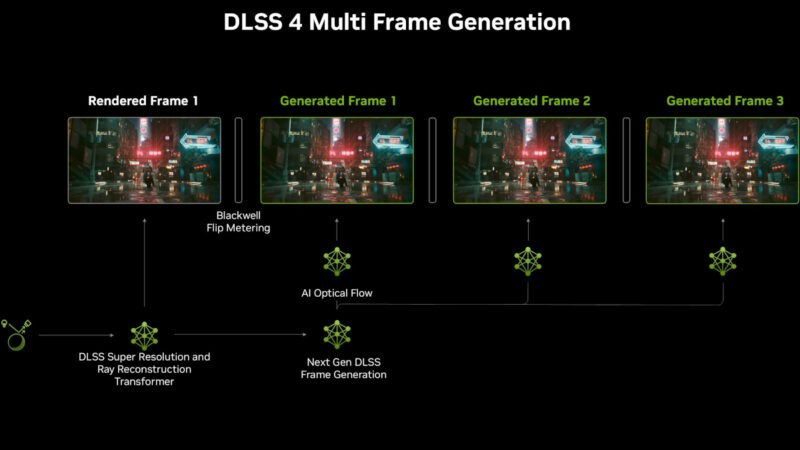
In some ways, yes, but in some other very significant ways, no.
Frame Generation, or more accurately frame interpolation, is achieved by duplicating (or tripling, quadrupling) rendered frames before sending them to the display. This is now Nvidia’s DLSS Frame Generation works, as well as AMD’s FSR Frame Generation, Intel’s XeSS Frame Generation, Lossless Scaling Frame Generation, and so on and so forth. Typically, in-engine Frame Generation provides the best results, and if you do use an external app like Lossless Scaling, accelerating it with a secondary GPU can further improve the results.
But here’s the key takeaway: while Frame Generation will look smoother, it won’t feel smoother, since increasing render (real) framerate is the only way to reduce input lag. In fact, Frame Generation can sometimes even increase input lag (by decreasing base FPS) when enabled, especially on an overworked single GPU that’s already struggling to hit 60+ FPS, resulting in a game that looks better but feels worse with it enabled.
In short, Frame Generation can be a good solution to make use of a growing market of high-refresh rate displays without emptying your whole wallet for an RTX 5090…but you still need enough CPU and GPU muscle to make the most of the upgrade. And realistic expectations as to what in-game graphics settings your CPU and GPU can handle.
Conclusion: Do You Need a 360 Hz Monitor?
For most gamers (and definitely non-gamers and casual gamers), the biggest benefit you’ll see after upgrading from 60 Hz is at 144 Hz. 240 Hz and 360 Hz do offer further benefits, but these are ultimately marginal compared to the 60-to-144 leap and come at a great monetary cost that is hard to justify unless you’re a genuine pro player.
Beside the much higher price of the monitors themselves, you’ll need to spend a lot more on your PC hardware in order to actually push 360 Hz—and if you’re gaming on consoles, you can’t actually go past 120-144 Hz anyway. Even updating this article years down the line, that story has yet to change on consoles.
A high refresh rate monitor is a great upgrade to any gaming experience, but ultimately the only way to get better at a game is to… get better at a game. A fancy monitor or stronger hardware can only reduce what’s holding you back, not make you learn or play better.