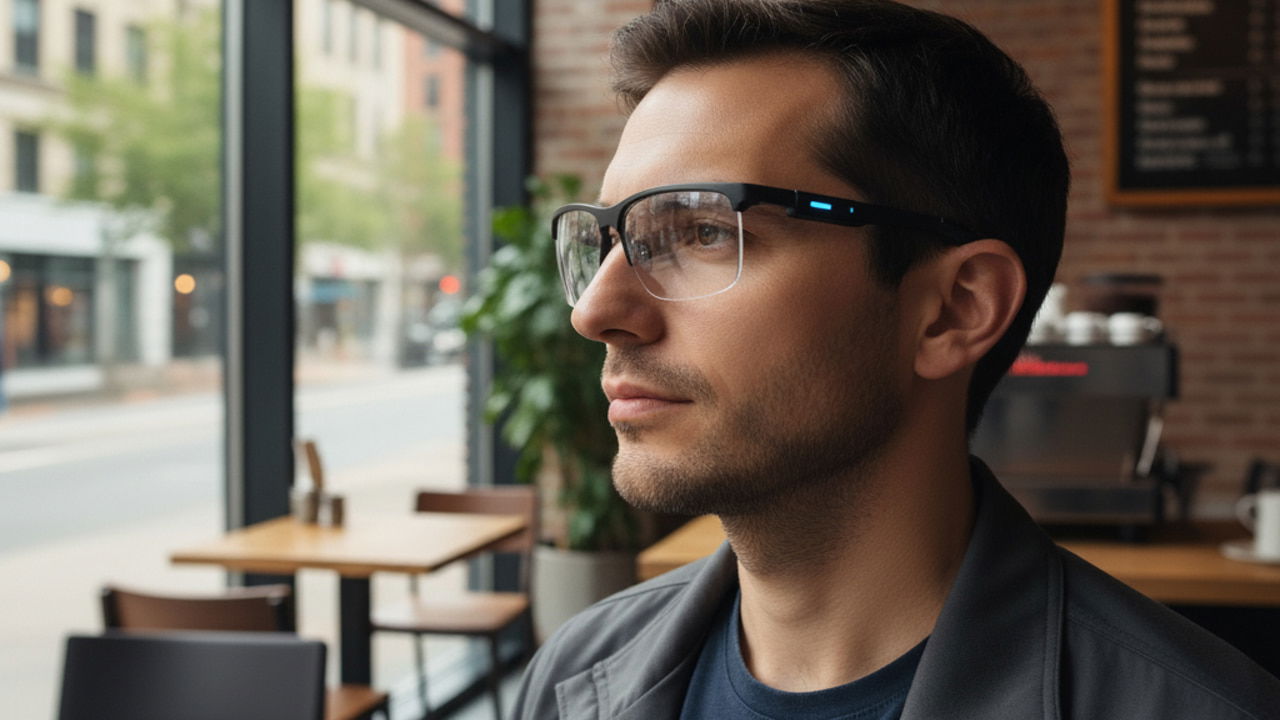
Smart glasses are becoming more compact, and many models today resemble regular glasses almost indistinguishably. While privacy-focused indicators have made secret recording less of a worry, smart glasses still give wearers an information advantage. If you want to be sure the person you are interacting with is not using smart glasses to get answers, here are some ways to detect it.
Look for Visible Hardware Cues
A prominent camera lens or an indicator light is easy to detect, but many smart glasses don’t have a built-in camera, or it’s not prominent unless in use. However, there are some other hardware clues you can look at to guess if it’s regular glasses or smart glasses. Look for the following distinct hardware cues:
- The temples are usually thicker as processors, radios, and batteries are usually housed there. Some might also have abnormally thick ear hooks, while the arms are thin.
- Holes on the sides, near the ear, or in the front area near the nose. These holes are for speakers and a microphone that regular glasses don’t have.
- They usually have thicker lenses due to the display components and the sensor. If you know the person’s eyesight isn’t too weak to use thicker lenses, it could mean they are using smart glasses.
- Any buttons, visible charging ports, or magnetic pogo-pin arrays are also obvious signs of smart glasses.
- If the user has a glasses case nearby, you can also look for a power button, charging cradle, USB port, etc., that aren’t found on normal cases.
Check User’s Behavior
Communicating with smart glasses will change the normal behavior of the user, even if they try to hide it. You can look for subtle signs that can indicate they are communicating with the glasses:
- To read the display contents, the user will look at the lenses, which will make it seem like they are either looking through you or something below. They might also tilt their head a little to adjust the display.
- Many smart glasses require taps and brushes for functions, so the user may interact with the temple arm or hooks often.
- For voice communication, they may repeat questions to send them to the smart glasses, and may reply more slowly with unnatural pauses.
If multiple of these signs are repeatedly showing, they may be interacting with smart glasses.
Use Your Phone’s Bluetooth to Catch Smart Glasses
Smart glasses usually use Bluetooth for connection. If you think a person is connecting their smart glasses with their phone, you can immediately turn on the Bluetooth on your phone to catch the smart glasses as a discoverable device. However, when in use, smart glasses won’t be discoverable by other Bluetooth devices.
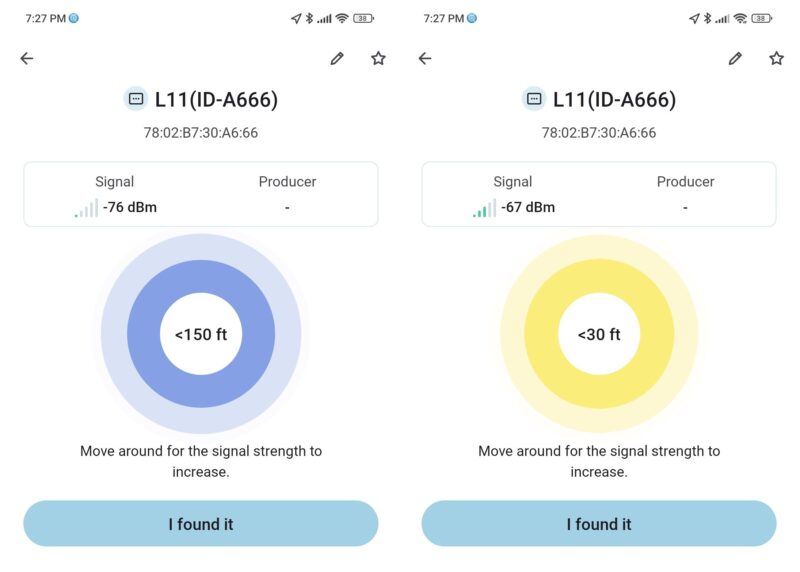
Thankfully, like many other Bluetooth devices, smart glasses also broadcast Bluetooth Low Energy (BLE) signals that can be caught with a BLE detector app. You can use an app like UFind for Android and Bluetooth BLE Device Finder for iOS to detect it.
Launch the app and press the Start button. It will show all nearby devices broadcasting BLE signals. While it won’t show the smart glasses name, you can check the RSSI signal strength to guess the position of the device. Just track RSSI signals while moving your phone towards and away from the smart glasses. If RSSI signals of a device change accordingly, then it’s probably smart glasses (unless the person has another Bluetooth device on them).
Check Audio and Visual Cues for Smart Glasses Communication
Smart glasses communicate using displays in the lens and sound using mini speakers or bone-conduction. While the communication is not meant to be seen/heard by other people, it can be caught if you try.
The display can show faint text or shapes in dim light. You may also notice purple/blue reflections when looking at the lens from an oblique angle, which is usually much different from AR coatings on regular lenses.
Since smart glasses have an open-ear design for speakers and use directional audio, it’s usually easier to hear them in quiet environments. Even with bone-conduction, you can hear some noise when it communicates.
Use the Phone’s Magnetometer to Detect the Magnetic Field Near Smart Glasses
All smartphones today come with a built-in magnetometer that can detect magnetic fields around ferromagnetic materials. Unlike regular glasses, most smart glasses have magnets in them for the speaker, charging port, or clip-on lenses. Your phone can easily detect the magnetic field from smart glasses if you bring the phone right next to them.
You’ll need a dedicated app for this purpose. We recommend Magnetometer for Android users and Magnetic Detector for iOS users. Launch the app, and it will show Earth’s magnetic field by default, which should be between 25-65μT. Now, bring the top side of your phone close to the smart glasses and check the reading. If it’s above 90μT, then it means there is a ferromagnetic material in it (likely smart glasses).
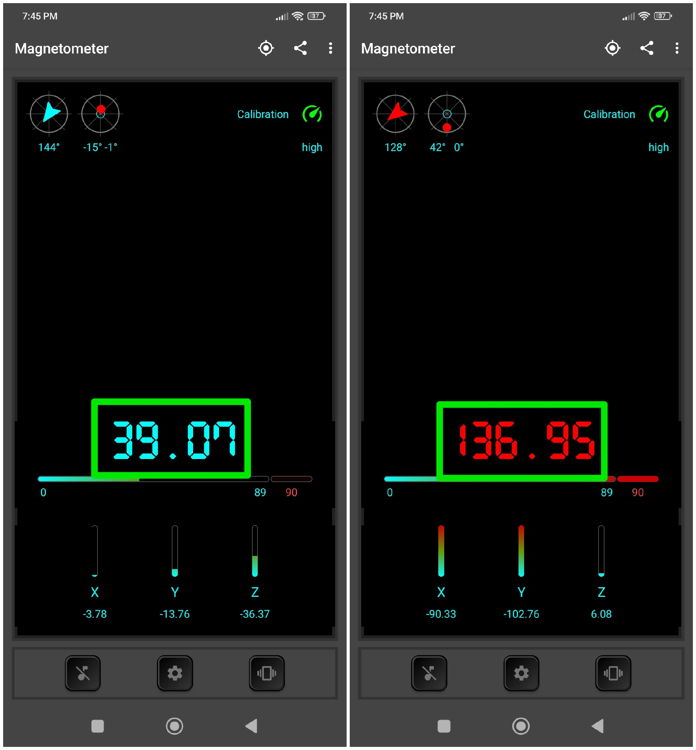
While it’s unlikely that ferromagnetic materials are used in regular glasses, they may have a magnet for specific functions, like front-connect readers or secondary lens clip-ons. However, these functions are easy to detect and confirm that they are not smart glasses.
You’ll have to combine multiple of these methods to confirm if a person is wearing regular or smart glasses. This is especially important for smart glasses that look like sunglasses – like Cybersight HUD Glasses – as it’s hard to track users’ behavior.